 Bitcoin Staking onboarding docs
01 / 04 · Before you exit
What happens when you early exit.
Who: you, together with whoever in your organization signs off on the decision. This is not a routine step, so treat it as a decision your organization makes rather than one you make at the keyboard.
You can exit early whenever you choose to. When you do, you get back every satoshi you locked, less the Bitcoin network fee, and you give up the rewards for the rest of the term. Your STX is the one thing that does not come back early: it stays locked until the bond reaches the end of its original term.
What you get back, and what stays locked
- You announce your exit with a Stacks transaction, and from that moment you stop earning for the rest of the term.
- Once your announcement is on chain, you send the locked Bitcoin back to your own vault, using a co-signature from the early-exit signer. All of it comes back to you, less the Bitcoin network fee.
- The early-exit signer is a service run for the protocol, and it sits outside your Fireblocks workspace. You can only get that co-signature once your announcement has settled on chain.
- Your STX stays where it is until the bond reaches the end of its original term. Leaving early frees your Bitcoin, not your Stacks, so please plan around that before you start.
- You cannot undo the announcement, and you cannot pick the bond back up if you change your mind.
- If you have earned rewards that you have not claimed yet, please ask your Stacks Endowment contact how to handle them before you announce.
- These steps cover bonds backed by native Bitcoin. If you bonded sBTC instead, you leave through a different action, and your Stacks Endowment contact can walk you through it.
Check how close the bond is to maturity
- Open your enrolled vault account and select Manage bond, then look at Unlock height and Blocks until unlock.
- If the bond is nearly finished, it is usually worth waiting it out. At maturity you get your Bitcoin back without announcing anything, and you keep every reward you earned along the way.
Before you begin
- Your organization has approved the early exit.
- The Fireblocks x Stacks app is open and authenticated, with the enrolled vault account visible.
- The vault account holds enough STX to pay the Stacks transaction fee for the announcement.
- Raw Signing and the Transaction Authorization Policy rule that allows it are still in place for this vault account.
- The approvers required by your Transaction Authorization Policy are available.
- Your Stacks Endowment contact knows you are exiting early.
02 / 04 · Announce the exit
Announce the early exit on Stacks.
Who: the operator, plus every approver required by your Transaction Authorization Policy.
When you announce, you are telling the protocol that you are leaving. This is the point of no return in these steps.
- Open the enrolled vault account and select Manage bond.
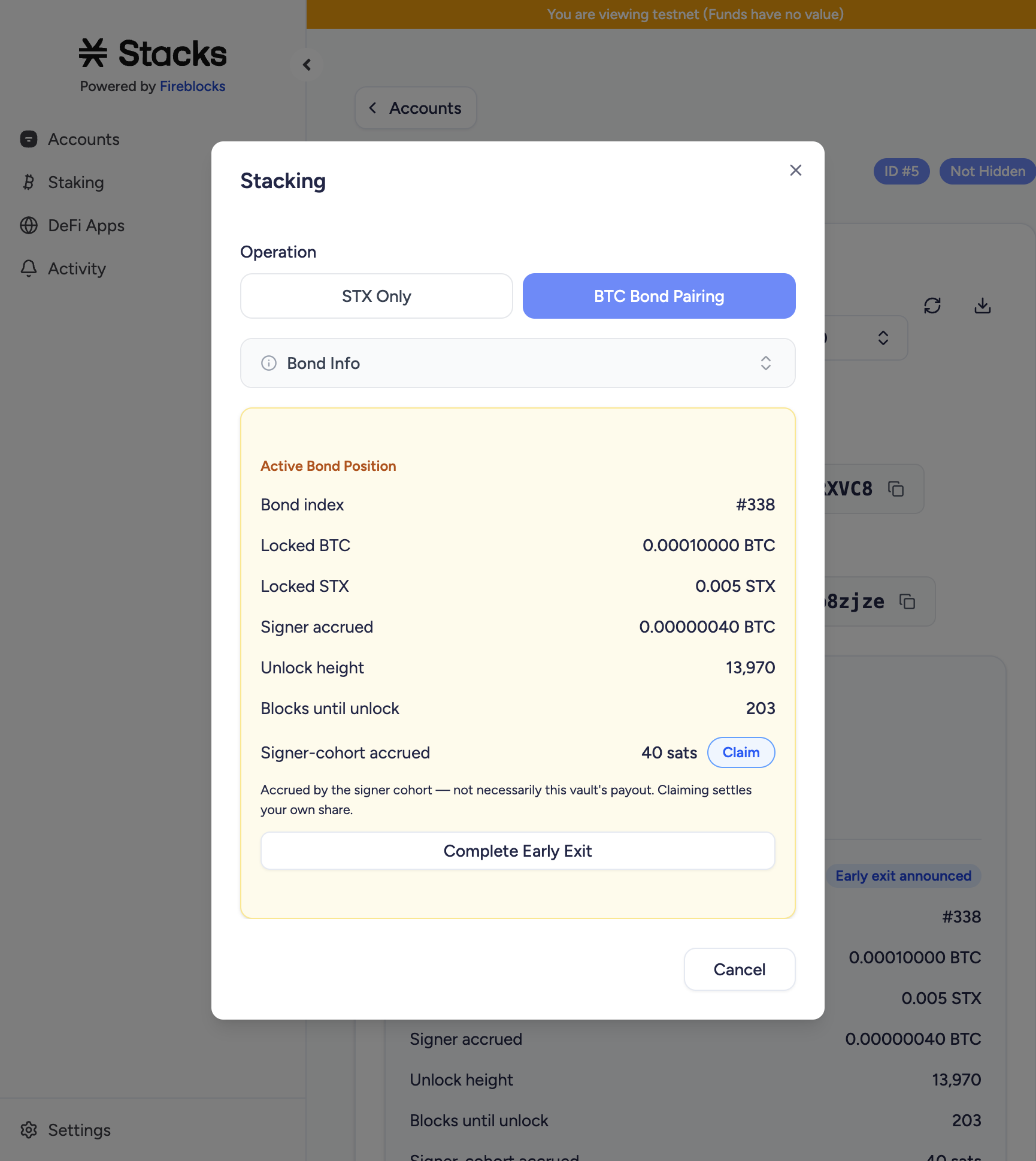
- Check the position against your records and your Enrollment Record. You will see the bond index, locked BTC, locked STX, unlock height, and blocks until unlock.
- Select Announce Early Exit and authenticate with Touch ID.
- Approve the signing request in the Fireblocks mobile app or through your workspace's automatic approver, per your Transaction Authorization Policy.
- Wait until you see Stacking Submitted. Copy the transaction hash, save it with your records, then select Done.
- Check that your position now reads Early exit announced.
- Open Activity in the sidebar and wait until you see the Announce Early Exit entry marked Confirmed with a View on Explorer link. Then open the transaction hash on a Stacks explorer and check that it reads Success.
03 / 04 · Recover the Bitcoin
Bring your Bitcoin back to your vault.
Who: the operator, plus every approver required by your Transaction Authorization Policy.
You send the locked Bitcoin yourself, using a co-signature from the early-exit signer. That co-signature only becomes available once your announcement has settled on chain, so there is nothing to do here until it has.
- Select Complete Early Exit. If your announcement is not confirmed yet, you will not be able to get the co-signature, so give it a moment and try again.
- Check that the destination is your vault account's own Bitcoin address. You will find it already filled in for you, so please do not type an address by hand.
- Leave the fee as you find it unless the Bitcoin network is busy enough to need more. If you see a warning that the fee looks unusually high, bring it back down.
- Check You receive. It should match everything you locked, less the network fee.
- Check that Early-exit signer network reads mainnet.
- Select Send BTC, authenticate with Touch ID, and approve the signing request per your Transaction Authorization Policy.
- Wait until you see that your Bitcoin transaction has gone out. Copy the transaction hash, save it with your records, then select Done.
04 / 04 · Verify the exit
Check that your Bitcoin arrived.
Who: you. You are not finished until your Bitcoin transaction confirms.
By now you should have both transactions in your own records and on chain. Treat your vault account page as the reliable view of the position. You may still see the bond listed as Active on the Staking page, with Lock spent under BTC committed, and that is expected rather than a problem.
- On your vault account page, check that your BTC Bond Position reads Reclaimed.
- Check that your Bitcoin balance has gone up by the full amount you locked, less the network fee. You can compare it against the BTC allocation in your Enrollment Record.
- Leave your STX alone. It stays locked until the bond reaches the end of its original term and then unlocks on its normal schedule, so there is nothing for you to do. If you want the exact date, your Stacks Endowment contact can confirm it.
- Keep the announcement transaction ID and the Bitcoin transaction ID with your records.
- Let your Stacks Endowment contact know that you are out.
If something goes wrong
You cannot see Manage bond
Check that you are looking at the vault account that actually holds the bond. If you cannot see the position at all, please contact your Stacks Endowment contact before you do anything else.
You see a Failed entry in Activity
You will not see a View on Explorer link on a failed entry, so the entry on its own cannot tell you whether anything reached the chain. Hover over it to read the error text.
Two causes account for most of these, and in both of them nothing was sent and you were not charged. The first is the prepare phase, where the error reads ERR_STAKE_IN_PREPARE_PHASE and nothing is signed; wait for the next cycle and try again. The second is a Touch ID prompt that was missed or cancelled, in which case just open Manage bond and choose the action again.
If you want to be certain nothing went out, look up your vault account on a Stacks explorer and check that you see no new transaction and that the next nonce has not moved. Should you find that something did reach the chain, please talk to your Stacks Endowment contact before you try again.
Your announcement failed on chain
Save the error message and the transaction hash, and please do not retry straight away. Send the details to your Stacks Endowment contact and they will help you work out what happened.
Your Bitcoin transaction is not confirming
Bitcoin can simply be slow, so hold on to the transaction ID and give it time. Please do not create a second transaction while you wait.
Your co-signed spend was rejected
You can only get that co-signature once your announcement is on chain. Check that your announcement has confirmed on Stacks, then try again. If it still will not go through, your Stacks Endowment contact can pick it up from there.
You announced before the decision was final
There is no way to undo an announcement, and you have stopped earning for the rest of the term. The best thing you can do now is finish the recovery so that your Bitcoin is safely back in your vault, and let your Stacks Endowment contact know what happened.
Can I exit before the bond starts earning?
Yes. You do not need to wait for the bond to start. Even with Cycles until rewards showing 1 or more, you can announce as normal, and your Bitcoin comes back to you in the usual way. The prepare phase above is the only timing restriction you need to think about.
You cannot see Complete Early Exit yet
Wait until you see your announcement marked Confirmed and Success on Stacks, then reopen Manage bond. If you still cannot see the action once it has confirmed, please get in touch with your Stacks Endowment contact.
Your workspace policy blocked the signature
Your workspace may have Raw Signing switched off, or your Transaction Authorization Policy may not allow it for this vault account. Your Fireblocks Customer Success Manager is the right person to sort this out.
You have not received the co-signature
Check that your announcement reads Confirmed and Success, then try again. If you still cannot get the co-signature, send both transaction IDs to your Stacks Endowment contact, who will take it up with the team running the early-exit signer.